The SSH workspace that never closes.
Your servers.
Your terminals.
One workspace.
A modern SSH client that turns persistent tmux sessions into clickable tabs and panes. Connect to your servers, manage your work graphically, and pick up exactly where you left off.
Free. Windows alpha. Works with the SSH and tmux your servers already have.
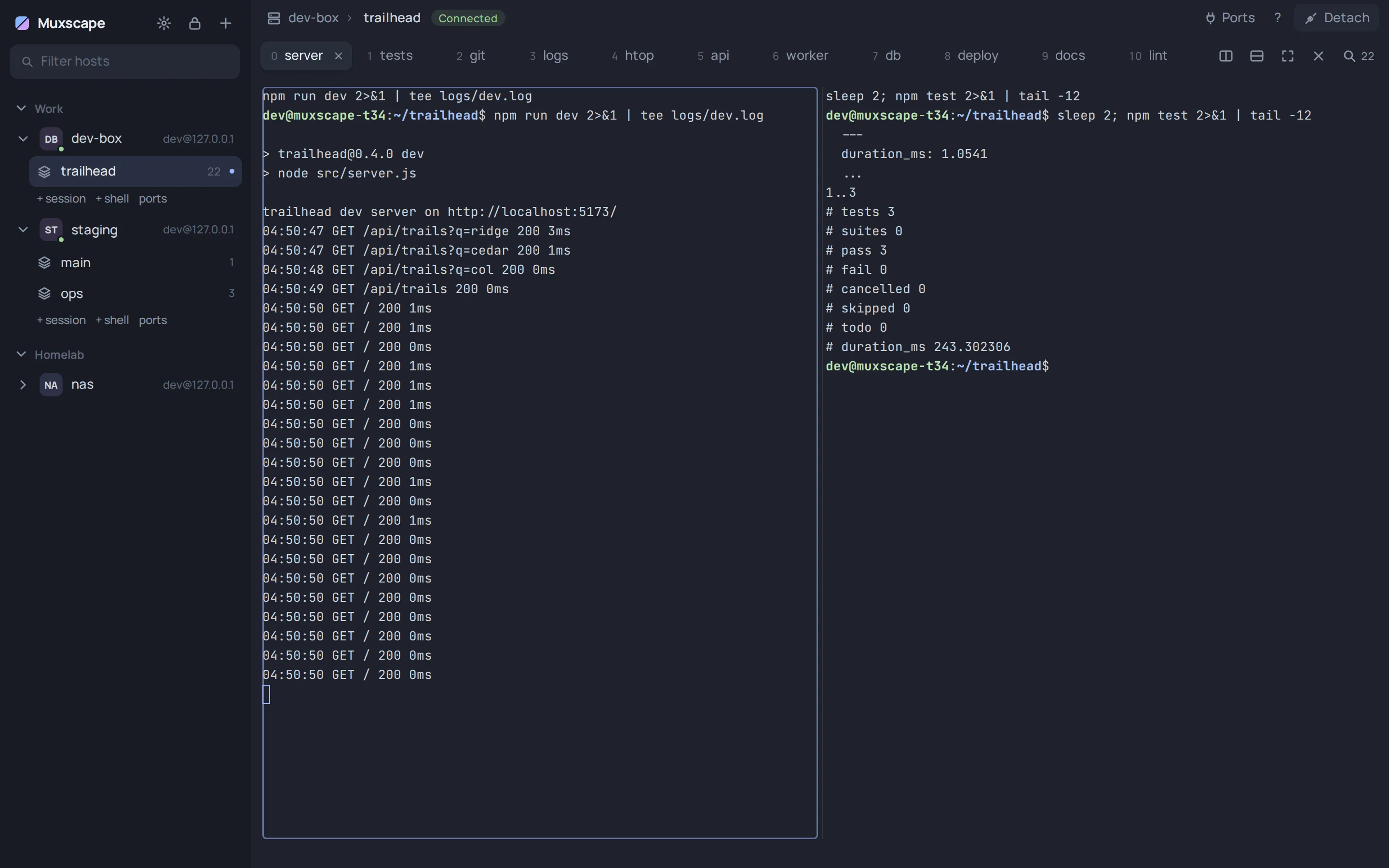
A real session: 22 tmux windows on one server, a second server below it.
- Tabs are tmux windows
- Click window 17 instead of remembering it. Split, drag, rename, close: each one is a real tmux command.
- Nothing stops when you leave
- Close the app or lose Wi-Fi. Your builds, servers and agents keep running on the server.
- Come back to exactly that
- Muxscape reconnects and rebuilds every tab and pane from what tmux reports.
Everything tmux does, without the keyboard gymnastics.
-
Twenty windows. One click each.
Your existing tmux windows become tabs. Split, resize, rename and close panes with the mouse; every action is a real tmux command, so a plain tmux attach sees the same thing.
- Drag a divider to resize a split
- Double-click a tab to rename the window
- Drag a tab out into its own window
-
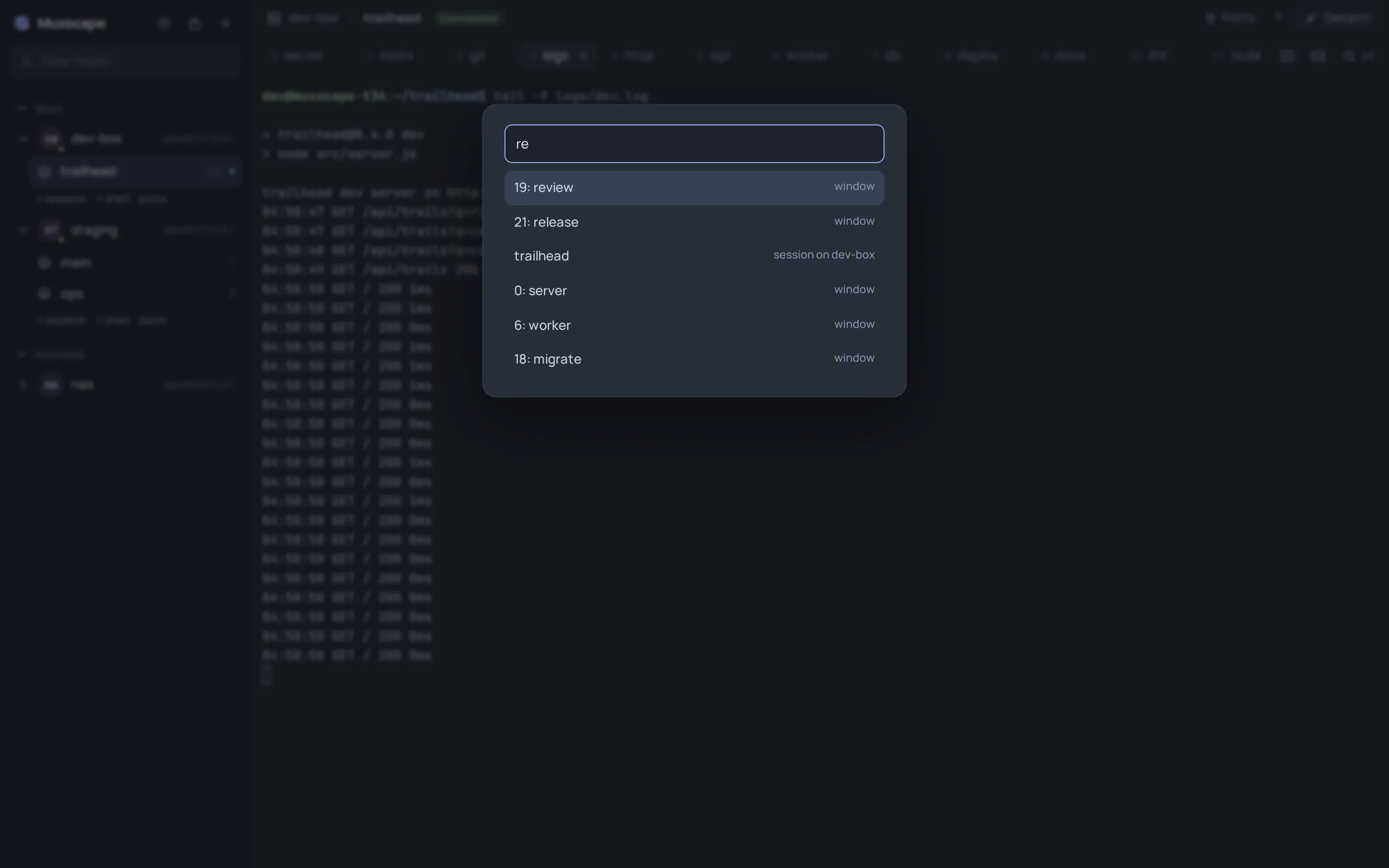
Find anything, fast.
The quick switcher fuzzy-finds every window and session across your servers. Twenty windows stops being a memory test.
- Ctrl+Shift+P jump to any window or session
- Alt+1…9 and Ctrl+Tab between tabs
- Ctrl+Shift+F find text in a pane
-
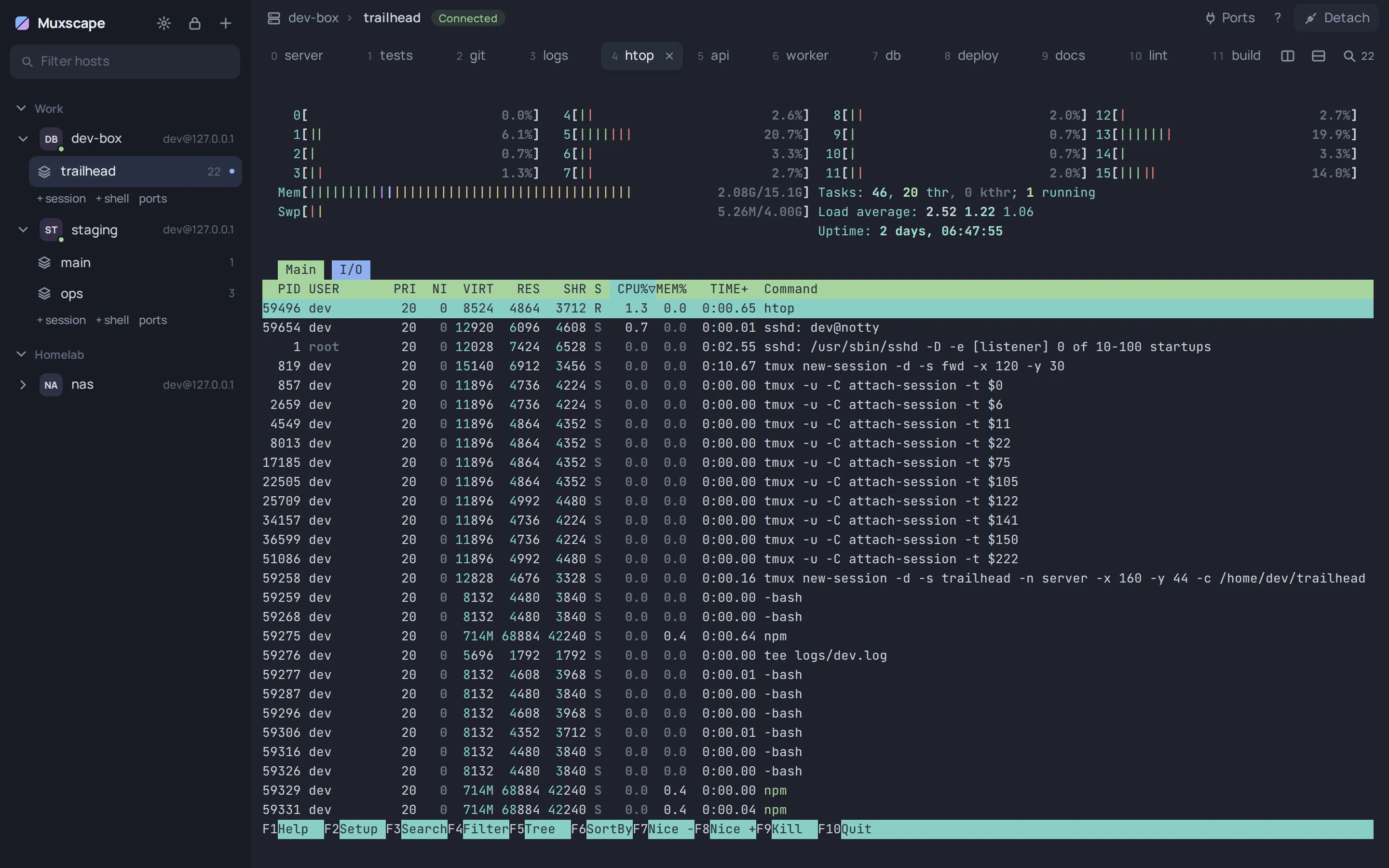
Full-screen programs look right.
Each pane is its own terminal, drawn at exactly the size tmux uses. htop, editors and TUIs render as they would in a local terminal.
-
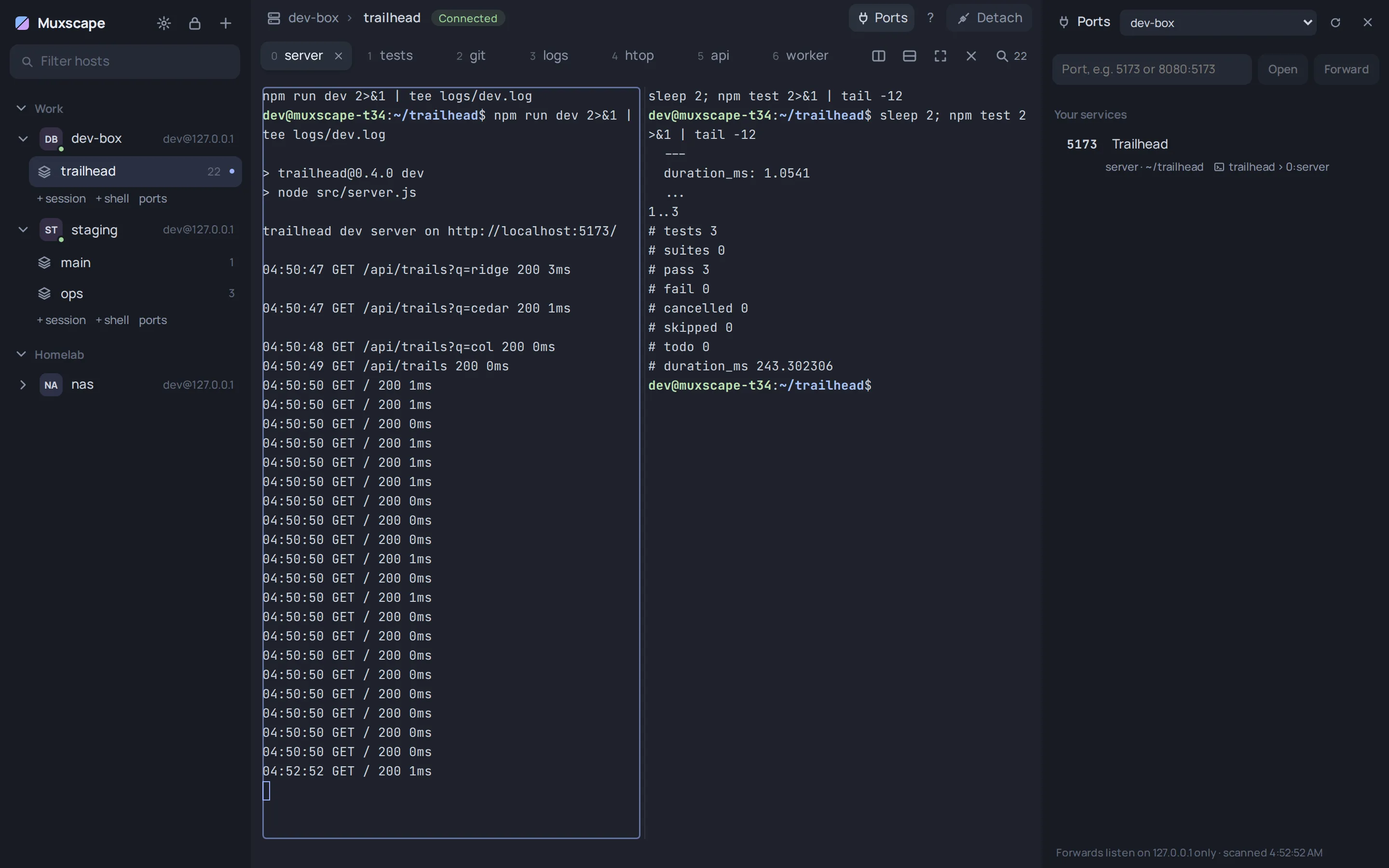
Your dev server, in your browser.
Start a dev server and Muxscape notices the localhost:5173 it prints. One click forwards it over your SSH connection and opens it. The Ports panel shows what's listening, what it is and which pane started it.
- Forwards listen on your machine's loopback only
- Pin a forward and it comes back on every connect
-
All your servers, side by side.
Each server keeps its own connection and sessions in the sidebar, organised in folders, with a colour per host.

Persistent workspaces
Remote processes survive SSH disconnections and app restarts. Muxscape reconnects on its own and puts every tab and pane back.
SSH host management
Saved hosts in folders. Hosts from ~/.ssh/config appear automatically, including Include, IdentityFile and ProxyJump. Keys, ssh-agent and jump hosts.
Careful with secrets
Host keys are checked against your OpenSSH known_hosts. Saved passwords are optional and encrypted (Argon2id, XChaCha20-Poly1305) behind a master password.
Built for long-running work
Editors, test watchers and coding agents like Claude Code or Codex keep running in tmux while you're away. Paste a screenshot or drop a file onto a pane and it's uploaded to the server, path typed for you.
Links that just work
Ctrl+click any URL in a terminal. A localhost link on the server is forwarded first, then opened.
Easy on the eyes
Four themes, six accent colours, adjustable text size and a colour per host so production never looks like staging.
How it works
- Step 1
Connect
Add an SSH host, or pick one from your existing
~/.ssh/config. - Step 2
Work
Open an existing tmux session, or start one. Its windows are tabs, its panes are splits.
- Step 3
Resume
Close Muxscape or drop off the network. Come back later and your workspace is exactly where you left it.
There's nothing proprietary on the server. Muxscape speaks standard SSH and drives the server's own tmux through tmux control mode. No background agent, no daemon, no account.
In motion
Two things that are hard to show in a still. Real recordings of the app against a real server.
Under the hood
tmux is the source of truth. Muxscape never keeps its own copy of your sessions: it asks tmux what exists, renders it, and turns every click into a tmux command. That's why another tmux client sees your changes instantly, and why there is nothing to lose when the app closes.
- Rust core
- Connections, sessions, port forwarding and the password vault, with tests that run against real SSH and tmux servers.
- SSH transport
- The russh library: keys, agent, jump hosts, keepalives, host-key checks against known_hosts.
- tmux control mode
- One control connection per session streams pane output and layout changes as structured events.
- Tauri desktop shell
- A small native app using the system webview, not a bundled browser.
- React + xterm.js
- Every pane is its own xterm.js terminal, sized to tmux's exact cell grid.
- Server-side persistence
- Your processes live in tmux on the server. The app can come and go.
Try the alpha
The first public alpha is for Windows (x64). Expect rough edges; tell us about them. Your servers need SSH and, for persistent workspaces, tmux.
Version 0.1.0 alpha for Windows 10/11 (x64), 5.4 MB.
SHA-256 6636358f5112e2d99ccd16cdade12a5246489bdead81a43a562567db82d650dd
The alpha isn't code-signed yet and is brand new, so warnings are expected. Your browser may say the file "isn't commonly downloaded" or is "suspicious": choose Keep (in Edge, open the download's … menu first). Windows SmartScreen may then say "Windows protected your PC": choose More info, then Run anyway. Compare the SHA-256 above if you want to be sure the file is ours. Signed builds are coming.
Open source
Muxscape is free and open source under the MIT licence. The code is on GitHub, along with the tests that run it against real SSH and tmux servers. Issues and pull requests are welcome.
Questions
What is Muxscape?
A desktop SSH client whose terminals are real tmux sessions on your servers. Each tmux window is a tab, each pane is a split you can click, drag and resize. Because the work lives in tmux on the server, it keeps running when you close the app or lose your connection.
How is it different from tmux?
It is tmux: Muxscape drives the tmux already on your server through tmux's control mode, so sessions, windows and panes are the real thing. What changes is how you use it: tabs instead of a status bar, mouse-driven splits, renaming by double-click and a quick switcher instead of prefix keys. You can still attach from a plain terminal at any time and see the same session.
How is it different from Termius?
Termius is a general-purpose SSH client. Muxscape is narrower: it is built around persistent tmux workspaces, so the thing you reconnect to is your running work (every window and pane), not a fresh shell. It has no account and no cloud sync; hosts and settings stay on your machine.
Does it require tmux to be installed?
On the server, yes, for persistent workspaces. Muxscape is tested against tmux 3.3 and 3.4. On a server without tmux you still get a normal shell, but it ends when the connection does.
Nothing needs to be installed on your own computer besides Muxscape, and nothing extra is installed on the server.
Do my processes survive disconnection?
Yes. They run inside tmux on the server, so closing Muxscape, losing Wi-Fi or restarting your laptop doesn't stop them. When the connection drops, Muxscape reconnects by itself and rebuilds your tabs and panes from what tmux reports.
Does it work with existing tmux sessions?
Yes. Sessions you already have show up in the sidebar; open one and its windows become tabs. Changes made from another tmux client (a plain ssh + tmux attach, another laptop) appear immediately, because tmux stays the source of truth.
Does it support Windows, Linux and macOS?
The first alpha is for Windows (x64). That is the build we use and test day to day.
Muxscape is built with Tauri, so Linux and macOS builds are possible, but they haven't been tested yet and there are no packages for them. They will be announced when they are.
Is it free and open source?
Yes. It's free and open source under the MIT licence, on GitHub at github.com/CubezCS-tys/muxscape.